How Windmill secured over-the-air installations on iOS
Approximately 5’ minutes reading time
This is an advanced topic. It requires extensive background knowledge and experience. Unless you feel confident with what’s being discussed here, consider and be mindful of intricacies and unknown unknowns when working with JSON Web Tokens, signing and secure URLs.
Table of Contents
Introduction
One of the unique challenges I had to face while building Windmill was how to secure access of apps distributed by Windmill on the Mac, made available for over-the-air installation on the iPhone.
Although the constraints discussed in this post are inherent to how wireless distribution is supported by iOS, there are valuable lessons to learn that could expand your knowledge and understanding to build better apps, secure services and make better use of HTTP in similar scenarios. It will also give you an insight to iOS as a mobile platform.
The main requirement is to secure access to a resource a URL points to. In this case access to an app. The user scenario goes like this:
- A user, taps on a link1 to install the app.
- The HTTP response is a “manifest”, an XML file, that itself references the URL to the file that needs to be secured.
- iOS, at the system level, makes a second
GETrequest to download the file.- The HTTP response is the app that iOS then installs on the device.
This is what the http trace would look like:
GET https://example.com/manifest.plist
⃪ 200 text/xml plist
GET https://www.example.com/apps/foo.ipa
⃪ 200 application/octet-stream ipa
Here are some limitations that are iOS specific:
- The two HTTP requests are done at the iOS level. Effectively as a developer you have no control over the lifecycle of these.
- It’s not possible to specify any headers or body to either HTTP request; e.g. no Authorization header.
- The first request, can only be comprised of a URL path; e.g. no query parameters.
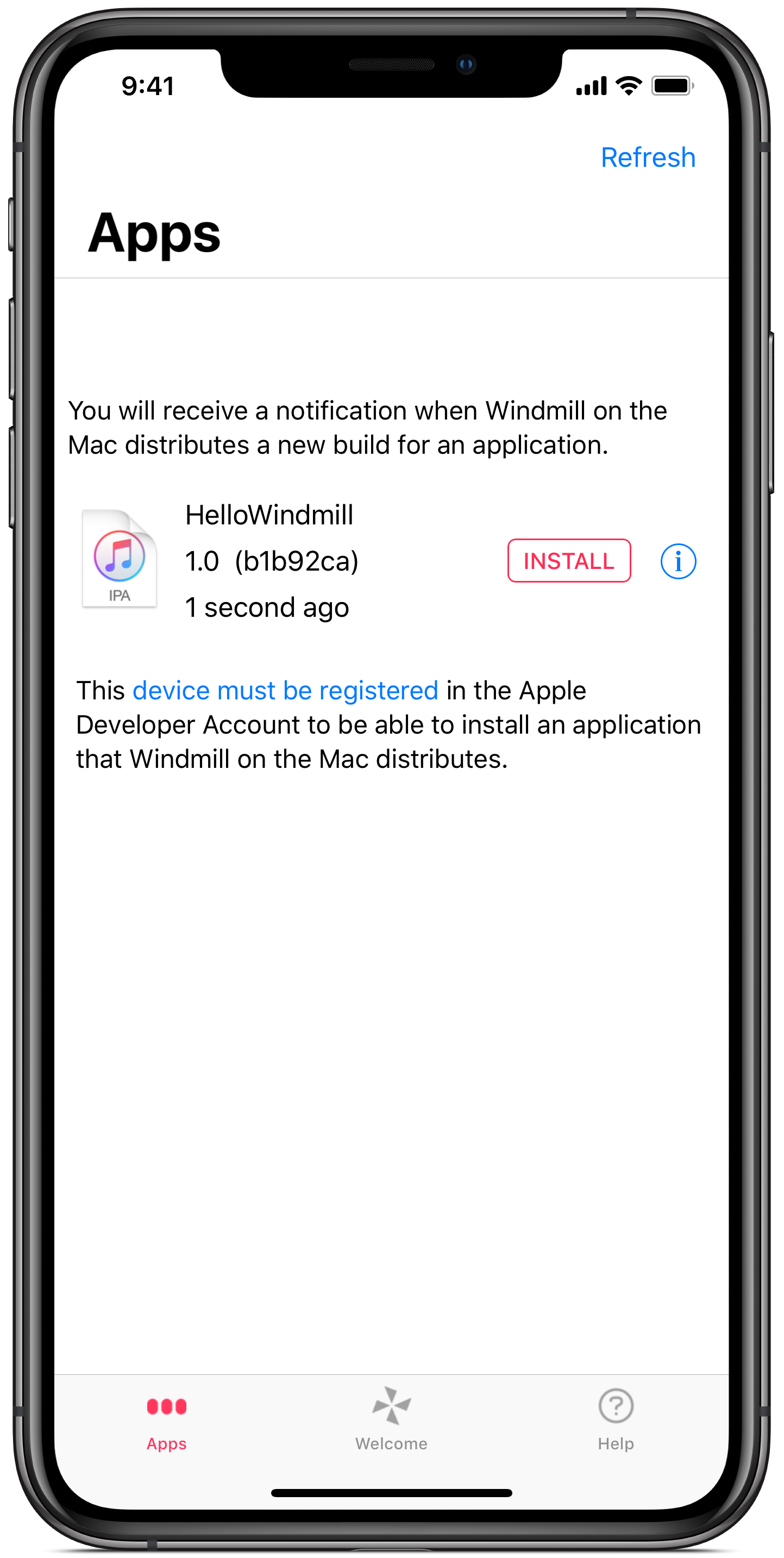
Windmill provides an iPhone app where a user sees a list of apps available to install. Below you can see Windmill on the iPhone listing a single app available to install on the device.
On top of the constraints that iOS poses on how to install an app over-the-air, I wanted to add some acceptance criteria from a user experience perspective. These are criteria that I anticipated a user will come to expect:
- A link to install an app should never be stale when the user tries to use it.
- A link can be used multiple times to install an app.
Securing access to a resource a URL points to
Typically, in order to secure a user scoped resource in a REST API, you would use an “Authorization” header, e.g.
GET https://example.com/manifest.plist
> Authorization: Basic QWxhZGRpbjpvcGVuIHNlc2FtZQ==
GET https://www.example.com/apps/foo.ipa
> Authorization: Basic QWxhZGRpbjpvcGVuIHNlc2FtZQ==
Effectively, by using an Authorization header you achieve two things:
- protect access to an app at a given URL
- provide access to a specific user
In the case of iOS over-the-air downloads however it is not possible to specify any headers or body to either HTTP request; e.g. no Authorization header. Another limitation is that the request to retrieve the manifest, can only be comprised of a URL path; e.g. no query parameters. Let’s consider how to secure the URL to retrieve the manifest without using an authorisation header or any query parameters.
Consider signed URL
Do not fall to the “none” trap by verifying only algorithms you support at the server.
Signed is enough unless the URL leaks.
Base64
Not Encrypted (even though there is JWE)
Pitfalls
- Encryption none. Make sure server supports that encryption.
Not user authorised but server originated and tampered proof
Public Download (Time limited / Replay attacks)
iOS access to a list of URL
Retrieving URL pointing to a manifest is protected behind an authentication. That is, in order to get a hold of a URL, a user scoped authorisation header must be provided.
Below is a sample manifest.plist. Notice how there is a url key that points to the location where the app can be found, e.g. https://www.example.com/apps/foo.ipa
The sample manifest is reduced for brevity
<?xml version="1.0" encoding="UTF-8"?>
<!DOCTYPE plist PUBLIC "-//Apple//DTD PLIST 1.0//EN" "http://www.apple.com/DTDs/PropertyList-1.0.dtd">
<plist version="1.0">
<dict>
	<key>items</key>
	<array>
		<dict>
			<key>assets</key>
			<array>
				<dict>
					<key>kind</key>
					<string>software-package</string>
					<key>url</key>
					<string>https://www.example.com/apps/foo.ipa</string>
				</dict>
			</array>
		</dict>
	</array>
</dict>
</plist>
Considerations
Which means there needs to be a way to refresh them.
That is easier said that done in a stateless architecture around a REST API and an iPhone app.
jti to be added to a black list
actually having a signed URL that do not expire could be enough, but, if for some reason the signed-URL leaks, every one can “replay” the GET request.
Thank you Paolo Malara for your advice and for pointing me in the right direction.
https://stackoverflow.com/questions/417142/what-is-the-maximum-length-of-a-url-in-different-browsers
-
In iOS, the URL to wirelessly install an app uses a custom protocol that points to a “manifest file”, e.g.
"itms-services://?action=download-manifest&url=https://example.com/manifest.plist". Typically, as recommended by Apple, this is implemented as an html anchor in a web page, with theitms-servicesURL as the value of thehrefattribute. ↩︎